Site Tweaks

I’ve had some extra free time lately, so I decided to make some long needed tweaks to the site; all of which were related to understanding WordPress and PHP more. Making those tweaks were fun because it helped me understand the WordPress environment a little better. Some of the smaller details of the site look better and more natural. I’ll continue making tweaks, like maybe adding a sidebar. I intentionally left out the sidebar, but I’m starting to think it would be a good idea, so I can make category and/or tag refinement possible. I would also like to make subscribing to categories and tags easier and more apparent.


* * *


Upgrading to Windows 8 Is Tempting But…

Today Microsoft officially released Windows 8 and I received my email with a promotional code to get the Pro upgrade at a discounted price since I recently purchased a computer. A link was also provided to download an upgrade assistant to see how my computer stacked up with Windows 8 requirements. They gave me the following compatibility issues to review:

Install an app to play DVDS – This one confused me because I thought that would be provided because it was in my copy of Windows 7. On further inspection, it is because Windows 8 does not come bundled with Media Center. In comparison, all versions of Windows 7 included Media Center except Starter and Home Basic. In Windows 8, only the Pro version will have the ability to add Media Center by purchasing the Windows 8 Media Center Pack. If you have the standard version, you will have to first upgrade to Pro before being able to add Media Center. You can do it in a one step process by purchasing the Windows 8 Pro Pack, which for a limited time, costs $69.99. Lucky for me, I will be upgrading to Windows 8 Pro, so I will have the ability to add the Windows 8 Media Center Pack for free; also a limited time deal. Both deals end January 31, 2013. If you want to add DVD playback to either version without purchasing extra packs, there are free players that come with the ability to play DVDs, like VLC and MPC-HC.

Sidebar gadgets aren’t supported in Windows 8 – I don’t really care about that. Never used them anyway.

Secure Boot isn’t compatible with your PC – I’m not sure what to think about this. Secure Boot has its merits, but I don’t think I’d want to deal with it anyway. I’m not dual booting anything at the moment, but if I was interested in doing so, I don’t think Secure Boot would allow me to.

Dual-Core Optimizer Version 1.1.4.0169 not compatible – This is software from AMD to circumvent an issue with multi-cored processors on pre-Windows XP SP3 machines. The incompatibility of this worried me at first, but after researching to see if there was an updated version that is compatible, I found out I don’t need it. I’m even sure why it came pre-installed on my  computer in the first place.

Hulu Desktop Version 0.9.14 not compatible – You want to know how long I’ve had this on my machine? Literally a day. You want to know how much impact this is going to have on my upgrade decision? Absolutely none.

Microsoft Security Essentials not compatible – Huh? Run that by me again? A security suite made by Microsoft isn’t supported by Windows 8? Why? Apparently Microsoft is reviving the Windows Defender brand that became superseded by Microsoft Security Essentials. It will now be superseding the superseder. Everything that Microsoft Security Essentials did though, Windows Defender will do. It only looks to be a rebranding using an old moniker.

ATI Catalyst Control Center & Install Manager need to be reinstalled – This one worries me the most. I found Windows 8 drivers for this, but I’m afraid that it won’t work as well as it does now in Windows 7. This is merely a personal worry, but I just want to make sure the drivers are adequate before I upgrade. I’m thinking it’s better to be safe than sorry in this instance. Once I feel confident about this, I’m pretty sure I’ll  make the upgrade.

Microsoft Office Starter 2010 – This will work in Windows 8, but I’ll have to install an update to it before I install the Windows 8 upgrade. I don’t care about Microsoft Office Starter 2010. A matter of fact, I thought I uninstalled it after I got this computer.

Trend Micro Titanium Internet Security – I’ll have to upgrade to version 2013 to get this to work in Windows 8, but I never used it anyway, so this doesn’t matter to me.

It’s very hard to not upgrade something that’s new and readily available, but I am going to try and hold off for stability reasons. Not that Windows 8 is an unstable product, but upgrading can be an aggravating process sometimes no matter what operating system you’re installing. And honestly, I’m not that excited to have to navigate through the new UI. Maybe that will change once I start using it, but as of now, it doesn’t look very appealing without a touchscreen.

(Edited on October 31, 2012 to correct details regarding how to add DVD playback to Windows 8.)


* * *


Iron Man 3 Trailer


I’ve been a fan of Iron Man since I was kid, so I was looking forward to the third installment in the Iron Man movie franchise already. Having seen the trailer for the first time today, now I am completely hyped for it. Looks to be much better than the second one. The trailer has a lot of action and is very dramatic. It does look a little familiar though…


ironmanmask-broken batmanmask-broken


* * *


Aerosmith – Legendary Child – Patriots Anthem

Pepsi and the NFL got together to release anthems for seven select teams from popular artists. The teams featured include the Dallas Cowboys, Detroit Lions, New England Patriots, New York Giants, New York Jets, Oakland Raiders, and Pittsburgh Steelers. All songs are a free download here. I’m featuring Aerosmith’s theme for the Patriots since they are my favorite team.


* * *


Pokémon Black Version 2 Friend Code

I told you I’d update you once I got my friend code, so here it is: 1077-8713-0967. I’m mainly a collector of Pokémon and items, but if you want to link up for any reason; just post a comment, send an email, or message me on any of my profiles.


* * *


IGN’s PokéDex

IGN recently released a web based PokéDex that gives users essential information regarding the many creatures in the games. It’s in the beginning process and there is much to be added for it to be relied upon completely, but it’s a great resource nonetheless. I normally use Bulbapedia for these instances and will continue to do so, but what I love about IGN’s PokéDex is that it has a great mobile friendly version. Since I started paying Pokémon Black Version 2, I’ve used it a few times to look up attack learnsets from my phone. It’s very convenient. Once Nintendo releases a 3DS based game, this will become even more convenient when you consider that you can start the 3DS web browser at any time during a game. I’d recommend checking it out if you’re always searching up information on the fly.


* * *


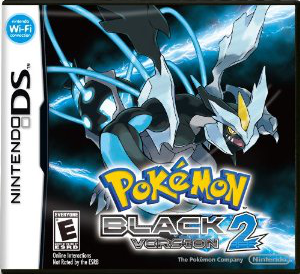
Pokémon Black Version 2

Cover art for Pokemon Black Version 2

I had to get my ID renewed, so I went to the RMV yesterday with a friend who gave me a ride; which is located in a mall. Since I had a long wait before I would be serviced, we did some other things. The first thing we did was go to Best Buy. While there, I figured I’d pick up a copy of Pokémon Black Version 2. I wanted to make sure to pick it up by November 12th because there is an ongoing event to obtain Genesect that ends on that date. I became surprised though that I couldn’t find it. I don’t know if they had a separate place for it, but it wasn’t anywhere near the other DS and 3DS games. Conveniently, there’s also a GameStop close by, so we headed there and was able to get it. I don’t have a friend code yet, but when I do, I’ll post it in case anyone is interested.


* * *


Will You Be Upgrading to Windows 8?

So will you be upgrading to Windows 8 when it gets released on October 26th? I know I won’t be. I bought a computer in August and qualified to get a Windows 8 upgrade for only $15. I’m happy to get the discount, but I’m hesitant to install it right out of the gate, which is kind of unusual for me. I used Linux for a little while and was always excited to upgrade to the new release on its first day of availability. I’m sure a lot of that was also because I wanted to have a more updated software repository. As of now, I’m perfectly happy with Windows 7 and don’t want to disturb that until I have more confidence in Windows 8. I also don’t want to deal with the new user interface. I don’t completely hate it, but it’s more suited for touchscreens. I wish Microsoft gave the user the ability to boot straight into the classic desktop environment. Having said that, getting to it is just a click away.


* * *


Linkin Park – Burn It Down

Linkin Park recently released a brand new single and it is awesome! Vocally and lyrically, it is what you expect from them. The tune is what really gets me because it sounds so awesome. Experimenting with an electronic sound with A Thousand Suns paid off with this track and hopefully the others with their latest release, Living Things, due out in June. If their next album does sound similar to this track, then their next album will be fantastic! I’m really looking forward to it.


* * *


Weird Morning

Every morning I set two alarms. I set my radio to go off at 5am (to His Radio, WRTP) as the preferred time I like to get up. I also set a clock to go off at 6am as the absolute latest I like to wake up and also as an emergency should something go wrong with my first alarm. That has happened on few occasions. Twice I forgot to set one and didn’t wake up to the other, resulting in a mad scramble to get to work on time. In both of those situations I was thankful I woke with enough time to get ready and not well after I was supposed to be at work.

This morning was a different story. I work Tuesday through Saturday. While a day off, I still like to get up early for Sunday, some days sleeping a little later if I feel like I need it. Monday is the only day I have the alarms completely off. Last night I made sure to turn both alarms back on, but I didn’t pay enough attention that the time was way off on my radio. Somehow the time on it got reset. I’m pretty sure it happened either Friday or early Saturday morning because I remember not waking up to my radio on Saturday. This morning I woke to my radio with the thought it was 5am. I turned my computer on, logged in, and went to the bathroom to take a shower. After my shower, I went to make a cup of coffee when I noticed the time on my stove and microwave read 2:55am. Confused, I checked my cell phone, my other alarm clock, and then my computer. All of them read the same time as the stove and the microwave.I laughed to myself, fixed my radio and went back to bed to get what little sleep I could get between 3am and 5am.

When I woke up at 5am for real, I repeated my morning routine. I had a tired morning because of what happened, but I felt better as the day went on. Normally, sleep irregularities don’t affect me until the day after. We’ll see how I feel tomorrow.


* * *